Hexo:为博客搭建免备案的评论系统

这群码农的脑洞,真的很大……
什么是Coding Comments
Gitment
静态博客是一种优雅地博客部署方式,但其一个痛点是难以在页面上与读者互动。 gitment hack 了 OAuth 流程,使用 GitHub Issues 的 OpenAPI 实现这样的功能。 只用创建一个 OAuth App,然后作为 JS 插件引入就好,真的很方便。 除了 GitHub 服务器在境外(所以有点慢)之外,别的都挺好的。
“coding-ment”
Coding Comments 是一个依托 Coding.net 的版本,使用 Coding.net 账号体系与项目讨论功能实现的评论功能,具有更好的体验。
访问Coding Comments了解更多
安装Gitment
npm install --save gitment创建自己的应用
-
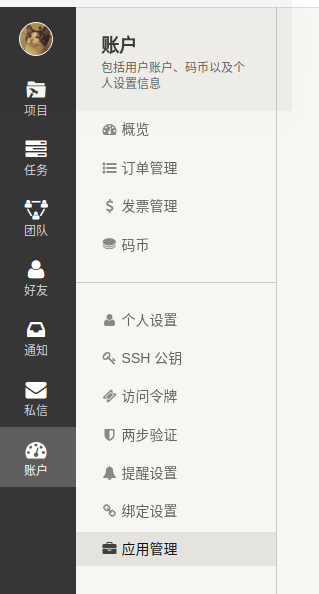
打开 [账户] -> [应用管理]
-
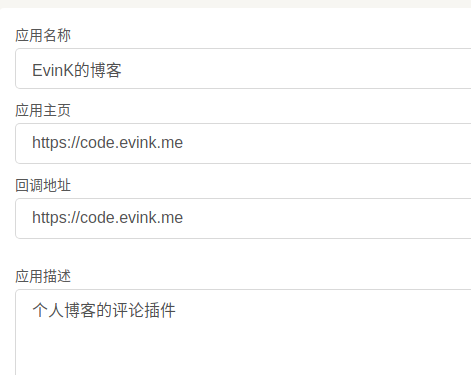
新建应用,填写如下
-
点击确定,得到Client ID和Client Secret
-
新建一个公开的新仓库,名字可以填hexo-comments
添加配置
- 在hexo的根目录下的_config.yml文件中,添加如下配置
coding_comments:
  owner: 'evink' # 填写你Coding.net的用户名
  repo: 'hexo-comments'  # 填写刚刚新建的仓库名字
  oauth:
    client_id: ''   # 填写申请的应用的Client ID
client_secret: '' # 填写申请的应用的Client Secret- 在themes/yilia/layout/_partial/article.ejs文件中追加以下代码:
注意在最后一个 右花括号 之前追加,添加完毕之后请务必检查下语法块是否正确对应。
<% if (theme.coding_comments){ %>
  <%- partial('post/gitment', {
      key: post.slug,
      title: post.title,
      url: config.url+url_for(post.path)
    }) %>
<% } %>- 修改themes/yilia/layout/_partial/post/gitment.ejs文件
请直接复制以下代码覆盖原文件(若不存在,请新建此文件)
<% if(theme.coding_comments){ %>
  <div id="gitment-ctn"></div>
  <link rel="stylesheet" href="https://dn-coding-net-public-file.qbox.me/Coding-Comments/v0.0.3/default.css">
  <script src="https://dn-coding-net-public-file.qbox.me/Coding-Comments/v0.0.3/gitment.min.js"></script>
  <script>
  var gitment = new Gitment({
      owner: "<%=theme.coding_comments.owner%>",
      repo: "<%=theme.coding_comments.repo%>",
      oauth: {
          client_id: "<%=theme.coding_comments.oauth.client_id%>",
          client_secret: "<%=theme.coding_comments.oauth.client_secret%>",
      },
  });
  gitment.render('gitment-ctn')
  </script>
<% }else{ %>
<div id="gitment-ctn"></div>
<link rel="stylesheet" href="//imsun.github.io/gitment/style/default.css">
<script src="//imsun.github.io/gitment/dist/gitment.browser.js"></script>
<script>
var gitment = new Gitment({
  id: "<%=url%>",
  owner: '<%=theme.gitment_owner%>',
  repo: '<%=theme.gitment_repo%>',
  oauth: {
    client_id: '<%=theme.gitment_oauth.client_id%>',
    client_secret: '<%=theme.gitment_oauth.client_secret%>',
  },
})
gitment.render('gitment-ctn')
</script>

<%}%>
完成
部署一下看下效果吧!
hexo d -g已知问题
- 评论有时候会无法加载出来(特别是新评论),Google一下可能与浏览器缓存有关
- 有时候点击登录按钮返回时,仍然处于未登陆的状态
- 有时候新文章会让你初始化两次(即存在一个既有的讨论贴,仍然会创建第二个)
不过,在这个万物皆备案的地方……
能用上一个速度尚可,配置简单的评论系统,已经很不错啦!
再次感叹,这群码农的脑洞真的大!
感谢
本文参考了博主 蒙奇·D·Hearain 的文章
感谢 Coding.net